

Table of Contents
- Why ROI Feels Like a Scam
- The Only Formula That Matters
- Tracking Pipeline: GA4 + UTMs + Reality
- A Social Media ROI Example (Real Numbers)
- What I Do When ROI Looks “Bad”
- FAQ
- My Top Recommended Gear
- Final Takeaway
How to measure social media ROI sounds simple until you try to do it and your dashboard starts lying to your face. You see likes, you see reach, you see “engagement rate,” and you still can’t answer the only question your CFO (or your own bank account) cares about: Did this make money? That gap hurts. It wastes time. It triggers bad decisions. So let’s fix it. I’m going to show you a practical, pipeline-first method that ties social activity to revenue and profit—without fantasy math or “brand awareness” coping mechanisms. 😅
Quick heads-up: if you want the cleanest tracking setup with GA4 + UTMs, start here and then come back—this is the exact fix I use when attribution turns into spaghetti: my GA4 + UTM tracking walkthrough for social media ROI.
Why ROI Feels Like a Scam
Snippet trap definition: Social media ROI equals the profit you can credibly attribute to social media divided by what you spent on social media (ads, labor, tools, production). If you can’t measure profit yet, start with attributed revenue, then tighten costs and attribution until the number reflects reality.
Here’s why most “ROI reporting” sucks: people confuse attention with outcomes. Social platforms love attention metrics because they keep you buying. Marketers love attention metrics because they look good in a slide deck. Nobody loves them when rent is due.
If your reporting includes impressions, likes, and saves but skips pipeline stages—clicks, leads, booked calls, sales—you don’t have ROI reporting. You have a vibes report. IMO, that’s how teams burn quarters without learning anything.
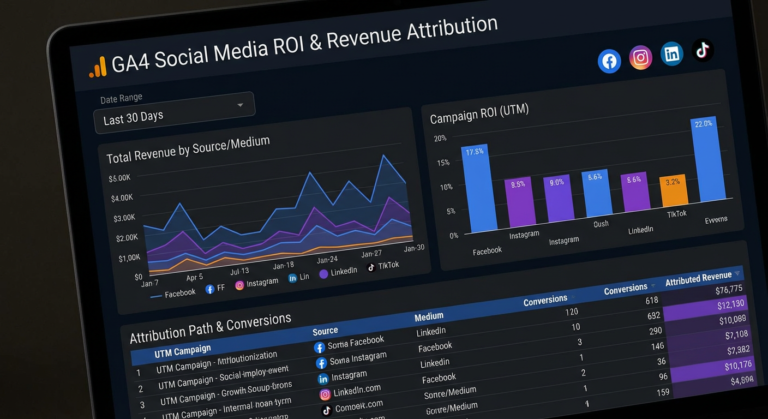
The other reason ROI feels broken: attribution leaks. Someone clicks Instagram, bounces, returns via Google, buys later, and your “social ROI” report shows zero. GA4 can handle multi-touch better than the old days, but only if you feed it clean data and stop treating UTMs like optional decoration. If you need a fast, practical setup, use this GA4 + UTM fix to plug the biggest holes.
The Only Formula That Matters
Let’s talk about the social media ROI formula in a way that survives contact with reality. Most people use this:
Basic ROI: (Revenue − Cost) / Cost
That works if you sell a simple product online and you track conversions correctly. But when you want an ROI number you can defend in a room full of skeptics, you need one upgrade:
The only formula I actually trust:
(Incremental Profit from Social − Fully Loaded Social Costs) / Fully Loaded Social Costs
Key word: incremental. Not “attributed because the last click came from social.” Incremental means the profit you gained because social activity happened, compared to what would have happened without it. You won’t always run perfect experiments, but you can get close by pairing attribution with sanity checks (holdouts, geo splits, timing tests, or channel lift comparisons).
Now the part everyone dodges: fully loaded costs. Include:
- Ad spend (obvious, but people “forget” it when ROI looks ugly)
- Labor (your time, staff time, freelancers, agency retainer)
- Tools (schedulers, creative tools, analytics, link tracking)
- Production (video shoots, editing, design, templates)
- Discounts/Promos used to convert social traffic
- Fulfillment/support costs tied to those customers (if you want profit, not revenue)
Want a legit reference point on what “ROI” means beyond marketing slang? Wikipedia covers the core definition clearly: return on investment basics. For measurement thinking (and why incrementality matters), I like how Google frames modern analytics and attribution in GA4 documentation: Google Analytics Help.
If your ROI math still feels slippery, don’t “fix” it with more spreadsheet gymnastics. Fix it with better tracking. Start with this GA4 + UTM implementation, then tighten your model week by week.
TL;DR on the formula
If you can measure profit, measure profit. If you can’t, measure revenue with honest costs, then graduate to profit once you connect COGS and close-loop reporting. Don’t call it ROI if it’s really “engagement per post.”
Tracking Pipeline: GA4 + UTMs + Reality
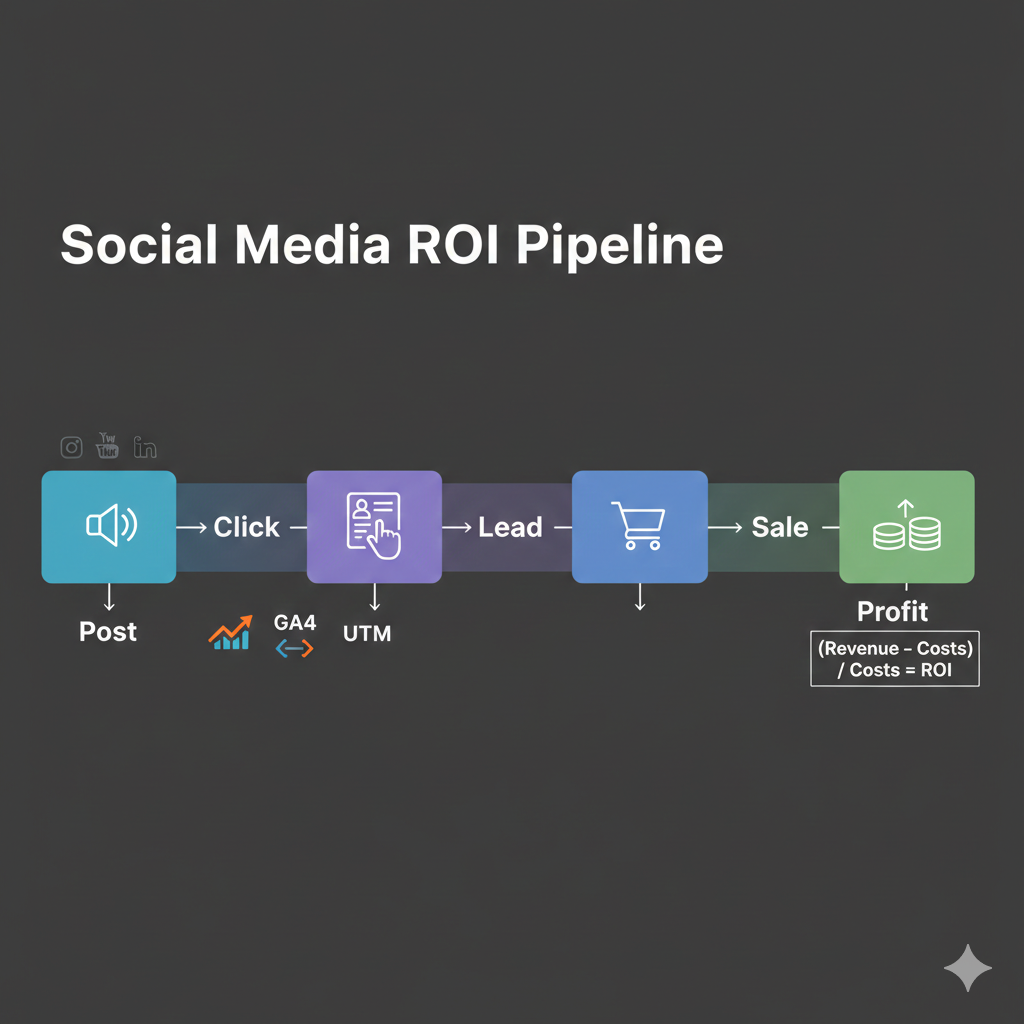
When people ask me how to calculate ROI for social media marketing, they usually want a clever metric. I give them an unsexy answer: build a tracking pipeline that doesn’t leak.
Here’s the pipeline I use for almost every brand, creator, and affiliate site:
- UTMs on every link that goes from social → site (no exceptions)
- GA4 events for the actions that matter (lead submit, checkout, call booking)
- One source of truth for revenue (Shopify, Stripe, CRM, or server-side events)
- Campaign naming rules so reports don’t turn into chaos
- Weekly ROI review cadence (not monthly post-mortems)
UTMs should describe intent, not just the platform. “instagram” doesn’t tell you anything. “instagram_reels_problemaware_hookA” tells you what worked. If you want a plug-and-play naming structure and the exact GA4 setup steps, use this fast GA4 + UTM fix guide.

My “No Excuses” minimum viable tracking
If you do nothing else, do these three things this week:
- Standardize UTMs (source, medium, campaign, content)
- Track a conversion event that maps to revenue (purchase or qualified lead)
- Assign a dollar value to that conversion (actual order value or lead value model)
If you run ads, Meta literally documents why you should validate signal quality and attribution instead of worshipping on-platform metrics: Meta Business Help Center. If you sell services, the U.S. Small Business Administration has straightforward guidance on measuring marketing performance in plain language: SBA marketing and sales guidance.
Pro Recommendation (ClickBank): Go Digital Home
f you want a “one dashboard” starter system that claims to walk beginners into online income without the usual chaos, Go Digital Income is positioned as a clean shortcut. The pitch is simple: create your account, activate a few income streams, then start driving traffic with a step-by-step setup—built for people who don’t want to sell on camera or build some complicated tech stack.
If you run social traffic to offers (affiliate or your own), Accelerator helps you build a clean “click → lead → sale” path you can actually measure. Pair it with UTMs and you’ll finally get numbers you can defend.
Get Go Digital Income (via ClickBank HopLink)
Note: A ClickBank HopLink is your tracking URL. It ties the click to your affiliate nickname + the vendor nickname, and you can add a tracking ID (TID) so you know exactly which page, post, or ad produced the sale. HopLinks Guide.
A Social Media ROI Example (Real Numbers)
Let’s do a clean social media ROI example with numbers you can replicate. I’ll use a simple ecommerce scenario first, then a service scenario.
Example 1: Ecommerce (direct purchase)
- Social costs (month): €1,200 ad spend + €800 labor + €100 tools = €2,100
- Attributed social revenue (GA4): €6,500
- COGS + fulfillment (40%): €2,600
- Gross profit from social: €6,500 − €2,600 = €3,900
Now apply ROI using profit: (€3,900 − €2,100) / €2,100 = €1,800 / €2,100 = 0.857 → 85.7% ROI. That means every €1 you invested returned €1.857 total, or €0.857 in profit. That’s a business channel, not a hobby.

Example 2: Services (lead → call → close)
Services get messy because revenue happens later. So you model it. Here’s the “good enough” model that beats guessing:
- Leads from social (tracked): 120
- Qualified rate: 35% → 42 qualified
- Close rate: 20% → 8.4 closes (call it 8)
- Average deal profit: €900
- Estimated profit: 8 × €900 = €7,200
- Fully loaded social costs: €3,000
ROI = (€7,200 − €3,000) / €3,000 = 1.4 → 140% ROI. That’s how you calculate ROI for social media marketing when you don’t have instant checkouts.
If you want this to feel less “model-y” and more “fact-y,” close the loop with your CRM. Add UTMs into your lead form hidden fields, store them, and report pipeline by campaign. The moment you do that, your content strategy stops being random content roulette. Use this GA4 + UTM setup as your baseline and build from there.
What I Do When ROI Looks “Bad”
When ROI shows negative, I don’t panic. I diagnose. Negative ROI usually means one of these four things:
- Tracking leaks (missing UTMs, broken events, cross-domain issues, attribution windows)
- Offer mismatch (you attract curiosity, you sell commitment)
- Weak conversion path (slow landing pages, unclear CTA, bad pricing framing)
- Wrong optimization target (you optimize engagement instead of conversions)
My 15-minute triage checklist
- Check GA4: do I see campaign traffic under Acquisition → Traffic acquisition?
- Check events: do lead/purchase events fire consistently?
- Check one campaign: does one angle beat the others by a mile?
- Check landing page: does it match the promise from the post?
- Check costs: did I include labor and tools honestly?
If the issue is tracking, I fix it first. If the issue is conversion, I tighten the offer and landing page. If the issue is audience intent, I change the content angle (pain-first, outcome-first, or objection-first).
Here’s the uncomfortable truth: social rarely fails because “the algorithm hates you.” Social fails because you push content with no measurement, then you act surprised when you can’t connect it to revenue. Fix the plumbing. Then scale. That’s the whole game.
FAQ
What’s the simplest social media ROI formula I can use today?
Start with (Attributed Revenue − Social Costs) / Social Costs. Then upgrade it to profit by subtracting COGS/fulfillment and using gross profit instead of revenue. If you want it to be bulletproof, move toward incremental profit.
How do I measure ROI when social assists conversions instead of closing them?
Use GA4 attribution reports and assisted conversions, but don’t stop there. Track lift with campaign timing tests or holdouts when you can. Social often plays the “introducer” role, and the ROI shows up later through search, email, and direct traffic.
What costs should I include when I measure social ROI?
Include ads, labor, tools, and production—minimum. If you want profit ROI, include COGS/fulfillment and any support overhead tied to those customers. If you ignore labor, your ROI becomes a bedtime story.
How often should I review social media ROI?
Weekly. Monthly feels safe, but it hides problems. Weekly forces learning loops: test → measure → adjust. If you want wins, you need cadence.
If your FAQ answers sparked a “wait, my setup doesn’t do that” moment, go implement the baseline tracking now: Social media ROI tracking with GA4 + UTMs (fast fix).
My Top Recommended Gear
- Elgato Stream Deck (speed up content ops and reporting shortcuts)
Check price on Amazon - Blue Yeti USB Microphone (clean audio makes social content convert better)
Check price on Amazon - Logitech Brio Webcam (sharp video for demos, testimonials, and authority posts)
Check price on Amazon
Final Takeaway
Measuring ROI doesn’t require magic. It requires honesty and plumbing. Use a real formula (profit over fully loaded cost), track the pipeline stages with UTMs + GA4, and review weekly so you can fix what breaks. Do that and you’ll stop arguing about “engagement” and start making decisions with numbers. That’s when social becomes a growth channel instead of a content treadmill.
Affiliate Disclaimer: Some links on this page are affiliate links. If you click and purchase, I may earn a commission at no extra cost to you. I only recommend tools I believe can support better tracking, clearer reporting, and stronger marketing execution.
ClickBank is the retailer of products on this site. CLICKBANK® is a registered trademark of Click Sales, Inc., a Delaware corporation located at 1444 S. Entertainment Ave. Suite 410 Boise, Idaho 83709 USA and used by permission. ClickBank’s role as retailer does not constitute an endorsement, approval, or review of these products or any claim, statement, or opinion used in promotion of these products.




One Comment
Comments are closed.