I’ve watched countless advertisers hemorrhage money because they fundamentally misunderstand Google Ads keyword match types. Here’s the brutal truth: your match type strategy can make or break your entire PPC campaign, yet most marketers treat it as an afterthought. You’re targeting what you think are perfect keywords, but Google’s showing your ads to searches that have nothing to do with your business. Your cost-per-acquisition keeps climbing, and you’re convinced Google Ads “just doesn’t work” for your industry. Sound familiar? The good news: I’m going to break down exactly how match types actually function in 2024 and share the rules I’ve learned from managing millions in ad spend over the past decade.
Table of Contents
- What Are Google Ads Keyword Match Types?
- Broad Match: The Misunderstood Powerhouse
- Phrase Match: The Sweet Spot for Most Campaigns
- Exact Match: Not as Exact as You Think
- Negative Keywords: Your Budget’s Best Friend
- Advanced Match Type Strategies
- Common Mistakes That Destroy ROI
- Frequently Asked Questions
- My Top Recommended Gear
What Are Google Ads Keyword Match Types?
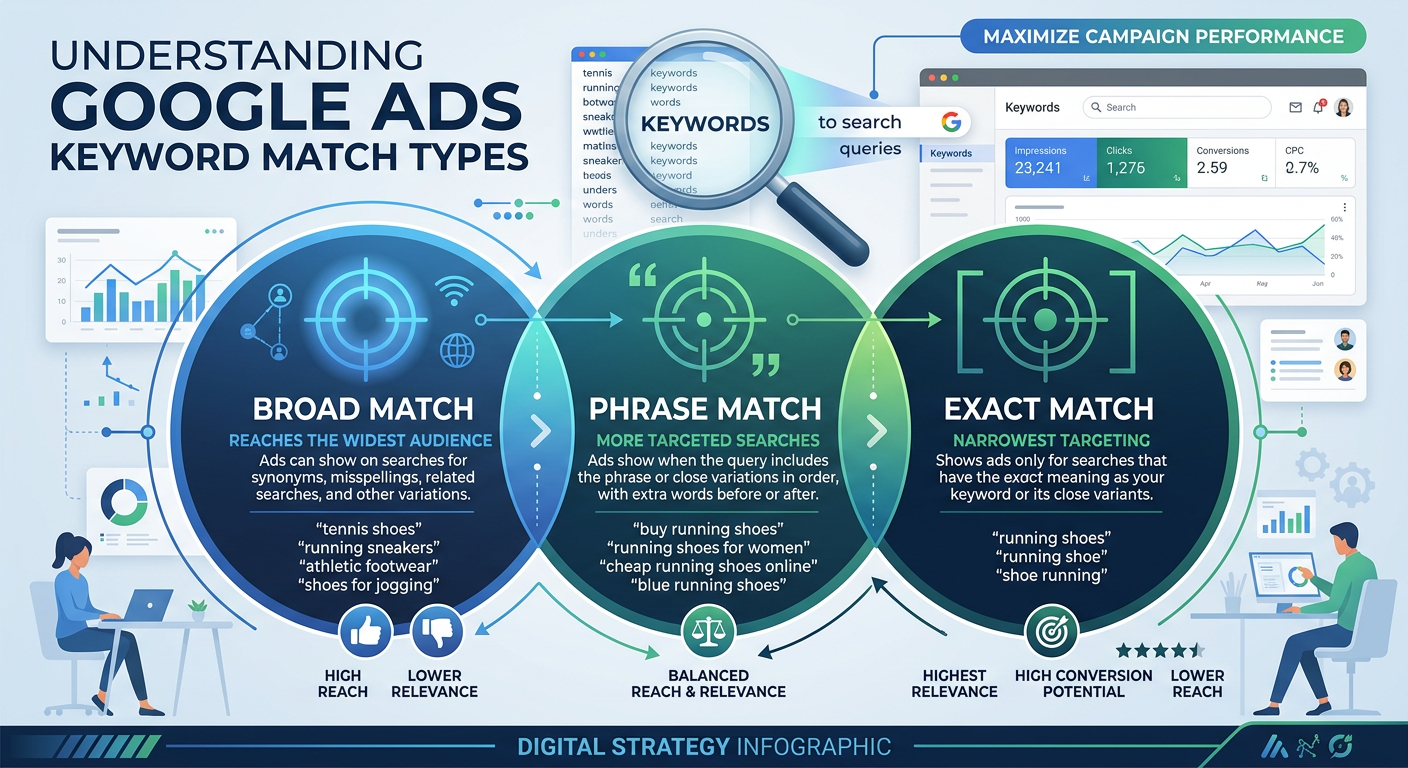
Google Ads keyword match types are settings that control which search queries trigger your ads. The three match types—Broad, Phrase, and Exact—determine how closely a user’s search must relate to your keyword before Google shows your ad. Understanding these settings is fundamental to successful keyword targeting and PPC optimization.
Think of match types as a dial that controls how wide you cast your net. Broad match throws the widest net possible, capturing searches that Google’s AI considers related to your keyword. Exact match (historically, at least) represented the tightest targeting. Phrase match sits somewhere in the middle, providing a balance that works well for most paid search strategy implementations.
Here’s what Google officially documents about match types, but I’ll tell you right now—the real behavior often differs from the documentation. That’s not Google being deceptive; it’s their AI constantly evolving. Let me walk you through what actually happens in live campaigns.
Broad Match: The Misunderstood Powerhouse
Broad match gets a bad rap, and honestly? It used to deserve it. Back in the day, using broad match was basically setting money on fire. But Google’s machine learning has come a long way, and broad match in 2024 is a different beast entirely.
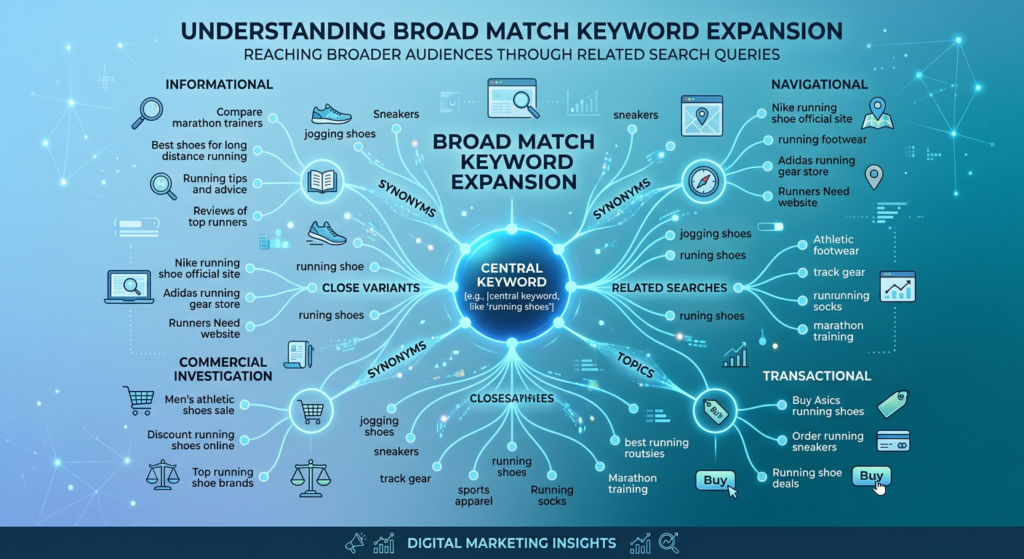
With broad match, your keyword “running shoes” might show for searches like “best sneakers for jogging,” “athletic footwear deals,” or “Nike trainers for marathon.” Google uses signals like landing page content, other keywords in your ad group, and user behavior to determine relevance.
When to use broad match:
- You’re using Smart Bidding strategies (Target CPA, Target ROAS, Maximize Conversions)
- Your account has sufficient conversion data (I recommend at least 30 conversions monthly)
- You want to discover new search terms you hadn’t considered
- You’ve built robust negative keyword lists
Here’s my insider take: broad match combined with smart bidding genuinely works now. Google’s algorithm learns which searches convert and adjusts bids accordingly. But—and this is crucial—you need conversion tracking dialed in perfectly. If your tracking is broken, broad match will absolutely drain your budget. Before implementing any aggressive paid ads setup, make sure your conversion foundation is rock solid.
Phrase Match: The Sweet Spot for Most Campaigns
Phrase match underwent a massive transformation in 2021 when Google merged Broad Match Modifier (RIP) functionality into it. Today’s phrase match includes the meaning of your keyword, making it far more powerful than the old “must contain the exact phrase” version.
Your phrase match keyword “running shoes” will now match:
- “shoes for running on trails”
- “buy running sneakers online”
- “best shoes to run in”
- “running footwear women’s”
Notice how the keyword phrase doesn’t need to appear in that exact sequence anymore. Google matches based on search intent targeting, looking for queries that share the same meaning as your keyword.
IMO, phrase match should be your default starting point for most campaigns. It provides enough reach to gather meaningful data while maintaining tighter control than broad match. According to WordStream’s research, phrase match typically delivers the best balance of volume and relevance for advertisers.
When you’re building out your overall marketing strategy, consider how phrase match keywords can complement your organic social efforts. The search queries you discover often reveal content opportunities beyond paid advertising.
Exact Match: Not as Exact as You Think
Here’s where I need to bust a major myth. If you think exact match means Google only shows your ad when someone types your keyword verbatim, you’re operating on outdated information. 🙂
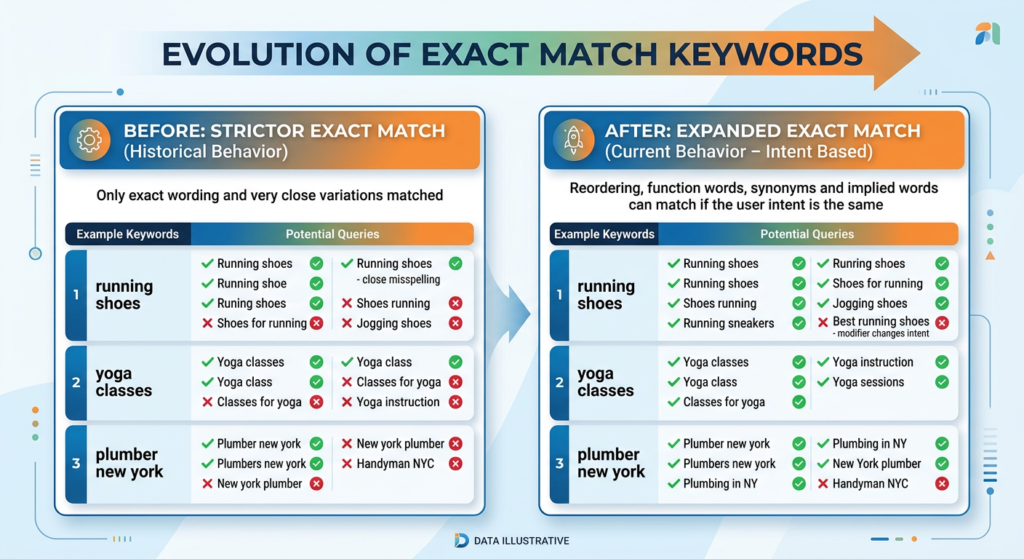
Exact match now includes “close variants” which encompass:
- Misspellings and typos
- Singular and plural forms
- Stemming variations (run, running, runner)
- Abbreviations and acronyms
- Synonyms and paraphrases
- Same-intent queries
Your exact match keyword [plumber near me] might show for “local plumbing services” or “plumbers in my area.” Google determines these searches share the same intent, so they qualify as close variants.
This evolution frustrated many PPC professionals initially, but I’ve come to appreciate it. The old exact match was almost too restrictive—you’d miss valuable traffic from slight variations. Today’s exact match gives you the tightest control available while still capturing relevant searches you might have missed.
Use exact match for your highest-converting, most important keywords. These are terms where you’ve proven ROI and want maximum control over spend and messaging.
Negative Keywords: Your Budget’s Best Friend
I cannot stress this enough: your negative keyword strategy matters as much as your regular keywords. Maybe more. Negative keywords prevent your ads from showing for irrelevant searches, and they use their own match type system.
Negative match types work differently than regular match types:
- Negative broad match: Blocks searches containing all negative keyword terms (in any order)
- Negative phrase match: Blocks searches containing the exact negative phrase
- Negative exact match: Blocks only that specific search query
Critical distinction: negative keywords don’t include close variants. If you add “free” as a negative, you won’t automatically block “freebie” or “for free.” You need to add each variation manually.
I review search term reports weekly for active campaigns and add negative keywords religiously. This single practice has saved clients hundreds of thousands in wasted spend. According to Google’s own guidance, strategic negative keyword usage improves campaign efficiency by filtering out unqualified traffic before you pay for those clicks.
Expert Commentary: This video from Google’s official channel provides a solid foundation on how match types interact with smart bidding—essential viewing before implementing the advanced strategies I’m about to share.
Advanced Match Type Strategies
Let me share some PPC optimization tactics that go beyond the basics. These are strategies I’ve tested across dozens of accounts and industries.
The Tiered Match Type Structure
Create separate ad groups (or campaigns, if budgets allow) for each match type targeting the same keyword theme. This lets you:
- Set different bids based on match type performance
- Write ad copy that matches search specificity
- Track which match type delivers best ROI for each keyword theme
The Discovery-to-Conversion Pipeline
Use broad match with smart bidding in a dedicated discovery campaign. Mine the search terms report for high-performing queries, then add those as phrase or exact match keywords in your core campaigns. This approach combines the reach advantages of broad match with the control of tighter match types.
Single Keyword Ad Groups (SKAGs) Revival
SKAGs fell out of favor when close variants expanded, but they still have their place. For your absolute top-performing keywords—the ones driving most of your conversions—create dedicated ad groups with exact match keywords and hyper-relevant ad copy. The quality score improvements often justify the extra management overhead.
These advanced Google Ads tips work best when you’ve established strong fundamentals. If you’re still building your marketing foundation, check out these growth systems and strategies that complement your paid search efforts.
Common Mistakes That Destroy ROI
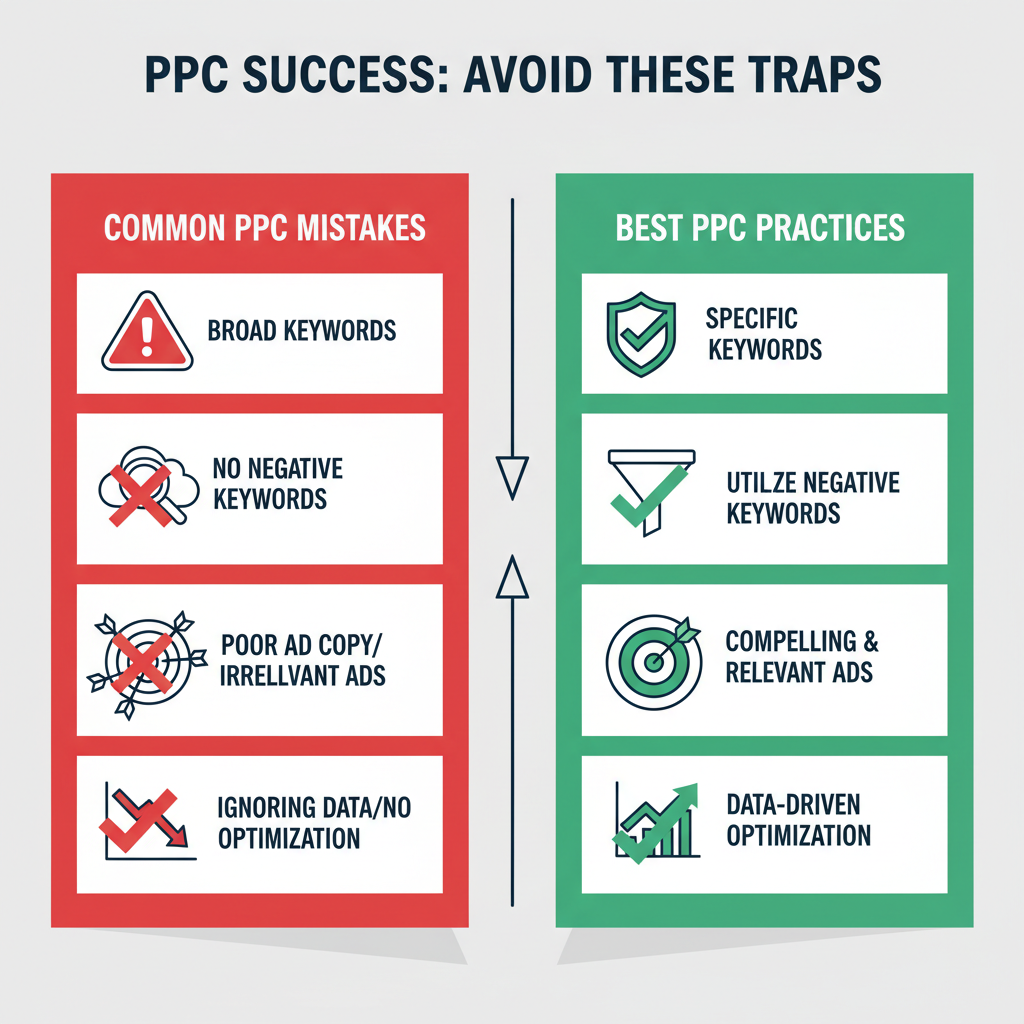
After a decade of auditing accounts, these are the mistakes I see destroying campaign performance over and over:
Mistake #1: Using Only Broad Match Without Smart Bidding
Manual bidding with broad match is asking for trouble. Google’s AI needs automated bidding signals to properly evaluate which broad match queries deserve higher bids. Manual bidding treats all impressions equally—recipe for disaster.
Mistake #2: Ignoring Search Terms Reports
If you’re not reviewing search terms weekly, you’re flying blind. Those reports show exactly what searches triggered your ads. I’ve found completely irrelevant traffic patterns that would have continued bleeding budgets indefinitely without regular review.
Mistake #3: Keyword Redundancy Without Priority Rules
Having the same keyword in broad, phrase, and exact match across ad groups creates competition within your own account. Establish priority rules (negative keywords, campaign priorities) to control which match type wins.
Mistake #4: Set-and-Forget Match Type Strategy
Match type behavior evolves. What worked last year might need adjustment. Google regularly updates how matching algorithms function. Stay current with changes from Google’s official product updates.
BTW, these mistakes compound when you’re also trying to manage social media and content marketing simultaneously. Consider building a comprehensive marketing system that accounts for how all your channels work together.
Frequently Asked Questions
What are the three keyword match types in Google Ads?
Google Ads offers three keyword match types: Broad Match (widest reach, uses AI to match related searches), Phrase Match (matches searches containing your keyword phrase with the same meaning), and Exact Match (most restrictive, matches searches with the same meaning as your keyword). Each provides different levels of control over which searches trigger your ads.
Which keyword match type should I start with?
Start with Phrase Match for most campaigns. It offers a balanced approach between reach and control, allowing you to gather search data while maintaining relevance. Add Exact Match for proven high-converting terms and use Broad Match strategically with smart bidding for discovery once you have sufficient conversion data.
Has Google removed Broad Match Modifier (BMM)?
Yes, Google phased out Broad Match Modifier in February 2021. The functionality was absorbed into Phrase Match, which now includes BMM-style matching behavior. Any existing BMM keywords in your account automatically function as Phrase Match keywords. You no longer need the plus (+) symbol notation.
How do negative keywords work with match types?
Negative keywords prevent your ads from showing for specific searches. They use their own match type system: Negative Broad blocks any search containing all negative terms in any order, Negative Phrase blocks searches containing the exact phrase, and Negative Exact blocks only that specific search query. Unlike regular keywords, negatives don’t expand to close variants.
Does Exact Match still match exact keywords only?
No, Exact Match has evolved significantly and now matches “close variants” including misspellings, plurals, synonyms, implied words, and searches with the same intent. Google’s AI determines intent matching, so [running shoes] might match searches for “jogging sneakers” if Google determines the intent is identical.
My Top Recommended Gear
Managing PPC campaigns effectively requires the right tools. Here’s what I use daily:
- Professional Keyword Research Tool: SEMrush or similar keyword intelligence platforms help you discover keyword opportunities and competitive insights essential for match type strategy.
- Dual Monitor Setup: Quality dual monitor stands transform your workflow when analyzing search term reports alongside campaign data—trust me, the productivity boost pays for itself.
- Analytics Dashboard Display: Large-format displays for real-time dashboards let you keep campaign metrics visible throughout your workday.
Disclaimer: This post contains affiliate links. As an Amazon Associate, I may earn a commission from qualifying purchases at no additional cost to you.


One Comment
Comments are closed.