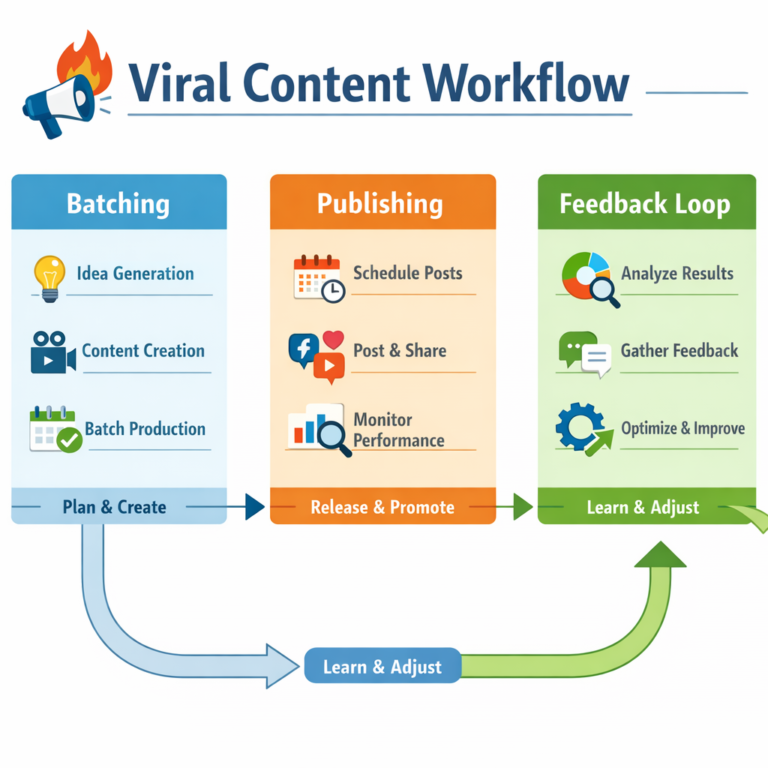

Nobody warned me how disorienting the first week with AI viral content idea generator workflows actually feels. You open the tool, stare at the prompt box, and suddenly realize you have absolutely no idea what you’re doing — and the tutorials make it look embarrassingly easy. That gap between how smooth it looks on YouTube and how chaotic it feels on day one? That’s not you being slow. That’s the hidden learning curve everyone pretends doesn’t exist.
Here’s the uncomfortable truth: most people who “master” AI content workflows don’t tell you about the two weeks they spent generating garbage outputs and second-guessing every prompt. They show you the polished pipeline, not the wreckage that preceded it. This article is the guide I wish existed when I started — written for the person who feels like they’re the only one not getting it yet. You’re not. And by the end of this, you’ll have a working system.
What You’ll Learn in This Guide
- Why Beginners Struggle With AI Content Workflows (And Why That’s Normal)
- What an AI Viral Content Idea Generator Workflow Actually Is
- The Three Non-Negotiable Building Blocks of a Viral AI Workflow
- Step-by-Step: Your First AI Viral Content Workflow in Five Moves
- The Biggest Myth About AI Content Marketing Nobody Admits
- Advanced Tactics: How to Make AI-Generated Ideas Sound Like You
- Frequently Asked Questions
- My Top Recommended Gear
Why Beginners Struggle With AI Viral Content Idea Generator Workflows (And Why That’s Normal)
Quick Answer: Beginners struggle with AI viral content workflows because the tools feel powerful but the prompting strategy feels invisible. The bottleneck is almost never the AI itself — it’s the absence of a clear framework for feeding it the right context, audience signals, and creative constraints before asking it to generate ideas.
Here’s what actually happens when most people try to build an AI content workflow for the first time. They type something like “give me viral content ideas for my fitness brand” and get back five suggestions that read like they came from a 2019 blog post. Deflated, they assume the technology is overhyped. They close the tab. They go back to manually brainstorming ideas the same way they always have.
What they don’t realize is that AI responds to context the way a great intern responds to a good brief. Give it nothing, get nothing useful back. Give it your audience’s deepest frustration, the platform you’re posting on, three competing posts that already performed well, and the specific emotion you want your content to trigger — and suddenly you’re staring at ideas that feel genuinely sharp. The tool didn’t change. The input did.
This isn’t a character flaw. It’s a training gap that nobody in the AI content marketing space is particularly eager to address because admitting the learning curve exists makes the product look harder to sell. TBH, the fact that you’re here reading this puts you ahead of most people who quit after day three.

What an AI Viral Content Idea Generator Workflow Actually Is
Let’s define this clearly because the phrase gets thrown around like everyone already knows what it means — they don’t. An AI viral content idea generator workflow is a structured, repeatable sequence of steps you follow to consistently produce content ideas with strong shareability potential, using AI tools to accelerate each stage.
The word “workflow” is doing heavy lifting here. A workflow isn’t just “use ChatGPT.” A workflow has trigger points, decision filters, and a clear output at each stage. Think of it like a production line rather than a vending machine. You’re not pressing a button and expecting a finished product. You’re running raw material — audience signals, trend data, your own creative instincts — through a series of AI-assisted stations that shape it into something publishable.
According to Harvard Business Review’s research on generative AI as a thinking tool, the creators who get the most out of these systems treat AI as a thought partner rather than an answer machine. That distinction completely changes how you architect your workflow from the ground up. If you want to get serious about the daily mechanics of this, the AI workflow for daily posting breaks down exactly how to keep that production line moving without burning out.
The Three Non-Negotiable Building Blocks of a Viral AI Workflow
What makes content actually go viral — is it the idea or the timing?
Both. But most people build their workflows around one and ignore the other entirely. The three components that every functional viral AI content workflow needs are: a trend intelligence layer, an audience tension map, and an iterative prompting protocol. Remove any one of these and your workflow produces content that’s technically competent but emotionally flat — and flat content does not spread.
Trend Intelligence Layer: This is how your workflow stays anchored to what’s actually happening in culture right now. Tools like Google Trends, Reddit’s rising posts, and AnswerThePublic give you a real-time signal on what your audience is thinking about before you open a single AI tool. Research from SparkToro’s audience research methodology consistently shows that content which intersects trending language with pre-existing audience frustration outperforms purely AI-generated ideas by a significant margin.
Audience Tension Map: This is simply a documented list of your audience’s core anxieties, aspirations, and objections — written in their exact language, not yours. You build it from comment sections, DMs, Reddit threads, and customer reviews. Once you have it, every AI prompt you write becomes dramatically more specific and the output becomes dramatically more useful.
Iterative Prompting Protocol: This is the part beginners skip entirely. A single prompt almost never produces your best idea. The protocol is: generate → evaluate → inject new context → regenerate → filter. It sounds slow but it takes about twelve minutes per content session once you have muscle memory for it. Master the hook mechanics first — mastering AI viral hooks and scripts will shortcut your prompting iteration loop significantly.
Step-by-Step: Your First AI Viral Content Workflow in Five Moves
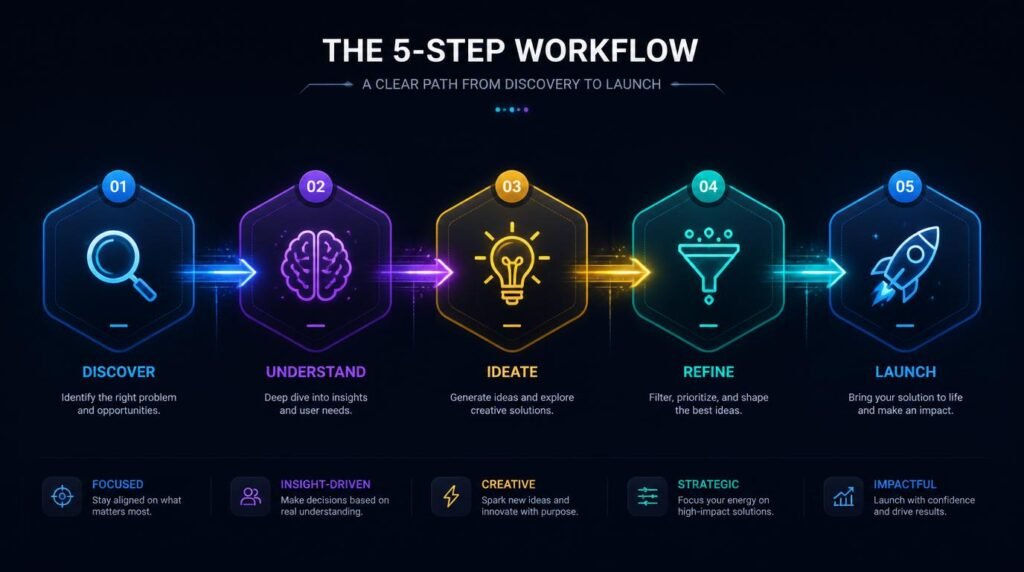
Step 1 — Anchor your workflow in a real audience problem, not a topic
Open a blank doc and write down the single most specific frustration your audience has right now. Not “they want more followers” — that’s a goal. The frustration is “they post consistently for three weeks, see no growth, and quietly give up.” That’s the emotional engine. Every content idea you generate needs to connect back to this tension point.
Step 2 — Pull live trend signals before you prompt anything
Spend five minutes on Google Trends and two minutes scanning the top posts in two relevant subreddits. You’re looking for language patterns, not just topics. The exact phrasing people use when they’re frustrated is pure gold for your prompts. Copy three to five verbatim phrases into your prompt document.
Step 3 — Run your AI idea sprint with context-rich prompts
Now open your AI tool — ChatGPT, Claude, or Perplexity — and feed it everything: the audience frustration, the trending language, the platform you’re creating for, and the content format you need. Ask for twenty-five raw ideas. Do not filter while generating. Volume first, judgment second.
Step 4 — Score for viral signals and cut ruthlessly
Score each idea against three criteria: Does it trigger an emotion immediately? Does it contain a counterintuitive or surprising element? Would someone send it to a friend? Keep the top five ideas. Delete the rest without guilt — those twenty discarded ideas were necessary to get to the five good ones. That’s the process, not a failure of the process.
Step 5 — Build, publish, and learn from real data
Turn your five ideas into drafts, schedule them across your publishing window, and track which angles generate saves, shares, and comments — not just views. That performance data becomes the feedback loop that makes your next AI prompting session smarter than your last one. For a turnkey version of this output system, the viral content workflow for beginners gives you the exact no-frills template to run this consistently.
Why this is worth your time: This walkthrough from a working content strategist shows the actual prompting sequence inside ChatGPT for generating platform-specific content ideas — specifically the moment he pivots from vague prompts to context-injected ones and the output quality shifts dramatically. That moment alone is worth the watch.
The Biggest Myth About AI Content Marketing Nobody Admits
Is AI content automation actually making creators more productive — or just faster at producing mediocre content?
Here’s the counterintuitive claim I’ll stand behind: AI content automation, used incorrectly, makes most creators less competitive — not more. Let that sit for a second.
When AI tools flooded the market, the initial promise was volume. Produce more, post more, win more. And for about six months, that worked. Then every platform’s algorithm recalibrated because the average content quality dropped across the board as everyone started pumping out the same AI-flavored angles on the same trending topics. The signal-to-noise ratio collapsed.
The creators who actually pulled ahead weren’t the ones automating the most. They were the ones using AI to generate more diverse creative inputs and then applying rigorous human editorial judgment to filter ruthlessly. Nieman Lab’s reporting on AI in editorial workflows consistently shows that human editorial oversight — not AI volume — is the variable that separates quality content from noise. The workflow isn’t the edge. Your taste and your judgment inside the workflow is the edge.
Advanced Tactics: How to Make AI-Generated Ideas Sound Like You

How do you stop AI content from sounding like everyone else’s AI content?
This is the advanced layer that most beginners don’t reach because they’re still stuck trying to make the basic prompting work. But once your workflow is running, this becomes the most important creative skill you can develop. The technique is called voice injection, and it works like this.
Before you run any content generation prompt, you feed the AI a “voice document” — three to five paragraphs you’ve written yourself, in your natural writing style, on any topic you care about. You tell the AI: “This is how I write. Match this voice in everything you produce for me.” The output shifts immediately. It’s not perfect, but it’s about seventy percent closer to your actual voice than a cold prompt produces. You handle the remaining thirty percent in editing.
The second advanced tactic is what I call opinion injection. Most AI-generated content is neutral to a fault because the models are trained to hedge and balance. Virality, on the other hand, almost always has a point of view. Before generating any content, write three sentences that capture your actual opinion on the topic — including the part where you disagree with the conventional advice. Paste those sentences into your prompt as a creative constraint. The AI builds around your opinion instead of generating a sanitized version of consensus thinking. IMO, this single tactic is responsible for the biggest jump in content performance I’ve seen across AI-assisted workflows.
According to SparkToro’s analysis of top-performing content creators, the consistent differentiator in content that earns organic shares is the presence of a distinct, defensible perspective — not production quality, not posting frequency, not even topic selection. That defensible perspective is something you bring. The AI amplifies it.
The combination of a solid AI content workflow and a strong editorial voice is what separates content that gets bookmarked from content that gets scrolled past in 0.3 seconds. 🙂 And honestly, once you feel that difference in your own analytics, you never go back to generic prompting again.
Frequently Asked Questions
What is an AI viral content idea generator workflow?
An AI viral content idea generator workflow is a repeatable, step-by-step system that uses AI tools to research trending topics, generate content angles, write drafts, and schedule posts — all designed to maximize shareability and audience reach across social media platforms.
Which AI tools work best for viral content idea generation?
ChatGPT, Claude, and Perplexity AI are the strongest options for idea generation. Pair them with trend-spotting tools like Google Trends, SparkToro, or AnswerThePublic to ground your AI-generated angles in what real audiences are actively searching and sharing.
How long does it take to build a working AI content workflow from scratch?
Most beginners can build a functional AI content workflow in one to two weeks of consistent daily practice. The learning curve feels steep at first, but the bottleneck is almost never the AI — it’s learning how to prompt it with enough context to generate genuinely useful, platform-specific content ideas.
Can AI content workflows actually produce viral content or is it just hype?
AI workflows do not manufacture virality on their own. What they do is dramatically increase your output volume and idea diversity, which statistically increases your odds of hitting on a concept that resonates. Virality still depends on timing, audience fit, and execution — AI just removes the creative bottleneck that stops most people from publishing consistently.
What is the biggest mistake beginners make with AI content marketing workflows?
The biggest mistake is treating AI as a finished-content machine instead of a thinking partner. Beginners paste one vague prompt, get a generic result, and assume AI does not work. The real workflow involves iterative prompting, audience context, platform constraints, and human editing — AI handles the volume, you handle the voice.
How do I make my AI-generated social media content ideas actually feel original?
Feed the AI your own opinions, past experiences, audience feedback, and niche-specific language before asking it to generate ideas. The more context and personality data you inject into your prompts, the more the output sounds like you and less like every other AI-assisted creator in your space.
My Top Recommended Gear
Logitech MX Keys Advanced Wireless Keyboard
When you’re running AI content workflows for hours at a stretch, your keyboard becomes your primary creative interface — and this one has the tactile feedback and programmable keys that make prompt writing and editing dramatically faster than a standard membrane board.Check price on Amazon →
Blue Yeti USB Microphone
If you’re expanding your AI content workflow into video scripts and audio content — which you should be — the Blue Yeti captures broadcast-quality audio with zero post-processing fuss, which means less time fixing recordings and more time publishing.Check price on Amazon →
LG 27-Inch 4K UHD Monitor
Running a multi-window AI workflow — trend research, AI tool, draft editor, scheduling tool — on a single small screen is a silent productivity killer. A 27-inch 4K display lets you keep every stage of your workflow visible simultaneously without constantly switching tabs.Check price on Amazon →
Disclaimer: This post contains affiliate links. As an Amazon Associate, I may earn a commission from qualifying purchases at no additional cost to you. I only recommend products I’ve personally tested or rigorously researched.